
[Git] git reset HEAD vs git rm --cached
카테고리: git
태그: git
❗git reset와 git rm –cached 명령을 비교하기 전에 먼저 git에서 관리하는 파일의 라이프사이클에 대해서 알아보자.
🚴♀️라이프사이클
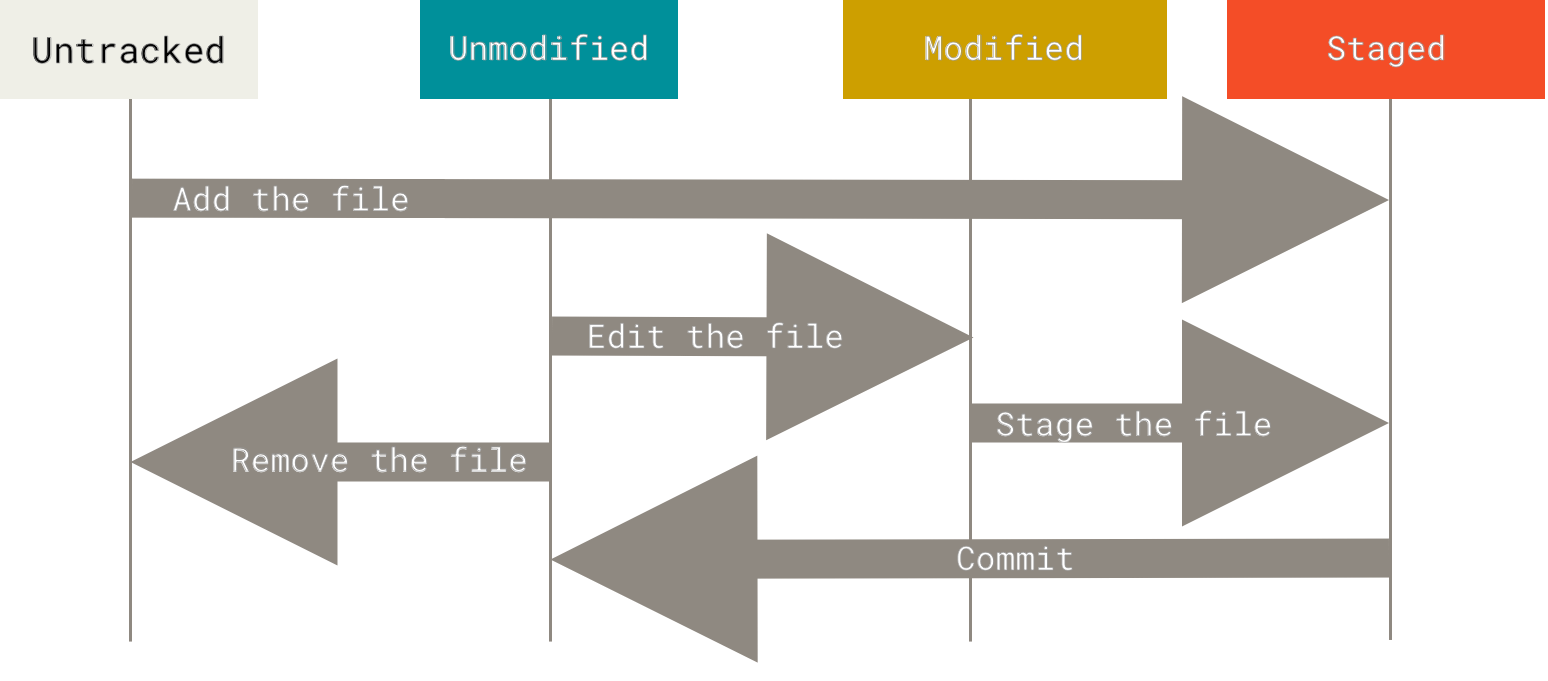
🚶♂️파일의 상태 변화 과정
-
working directory에 새로 생성된 파일은
Untracked상태에 있다.$ touch test.txt $ git status Untracked files: (use "git add <file>..." to include in what will be committed) test.txt -
Untracked상태에 있는 파일을 git add 명령으로staged상태로 변경할 수 있다.$ git add test.txt $ git status Changes to be committed: // staged 상태 (use "git rm --cached <file>..." to unstage) new file: test.txt -
staged상태의 파일을 커밋하면 해당 파일들은Unmodified상태로 변경된다. -
Unmodified상태의 파일을 git rm –cached 명령으로Untrack상태로 변경할 수 있다.$ git rm --cached test.txt rm 'test.txt' $ git status Changes to be committed: (use "git restore --staged <file>..." to unstage) deleted: test.txt Untracked files: (use "git add <file>..." to include in what will be committed) test.txt -
Unmodigied상태의 파일을 편집하면Modified상태로 변경된다.$ echo "Hello World" > test.txt $ git status Changes not staged for commit: (use "git add <file>..." to update what will be committed) (use "git restore <file>..." to discard changes in working directory) modified: test.txt -
Modified상태의 파일을 git add 명령으로staged상태로 변경할 수 있다.$ git add test.txt $ git status Changes to be committed: (use "git restore --staged <file>..." to unstage) modified: test.txt
💿git rm –cached
위 네번째 과정에서 보았듯 git rm --cached 명령은 track 되고 있는 파일을 Untrack 하고 delete 되었음을 stage에 반영한다. 간단히 말하면 staged 상태의 파일을 Untrackd 상태로 변경한다고 볼 수 있다.
git rm --cached명령은 working directory에 있는 파일을 실제로 삭제하지 않는다. 반면 git rm에 –cached 옵션이 없을 경우 실제 working directory에서 파일이 삭제된다. 하지만 커밋하지 않는다면 git restore –staged, git restore 명령을 연달아 사용하면 쉽게 복구할 수 있다. git rm –cached 명령은 .gitignore 파일에 추가하는 것을 빼먹었거나 대용량 로그 파일이나 컴파일된 .a 파일 같은 것을 실 수로 추가했을 때 유용하게 쓰일 수 있다.
🔙git reset HEAD
git reset HEAD 명령은 staged 상태의 파일들을 HEAD가 가리키는 최근 커밋의 상태로 되돌린다. 이때 working directory의 파일들은 변경되지 않는다.
$ echo "Hello World2" >> test.txt
$ cat test.txt
Hello World      // 이전 커밋 상태
Hello World2     // 이전 커밋에는 해당 줄이 포함되지 않음.
$ git add test.txt
$ git reset HEAD test.txt
Unstaged changes after reset:
M       test.txt
$ git status
Changes not staged for commit:
  (use "git add <file>..." to update what will be committed)
  (use "git restore <file>..." to discard changes in working directory)
        modified:   test.txt
$ cat test.txt
Hello World
Hello World2      // working directory는 이전 커밋 상태로 돌아가지 않음. --hard 옵션과 함께 수행 시 working directory 파일도 함께 변경됨.
“HEAD”에 대한 설명은 다른 포스트에서 정리하도록 하고, 간략히 소개하자면 HEAD는 일반적으로 브랜치를 바라본다.
HEAD -> 브랜치(참조 포인트) -> 최근 커밋
📌git reset HEAD vs git rm –cached 결론
🌓차이점
git reset HEAD: staged -> Unstaged (Untracked X)git rm --cached: staged -> Untracked
🌕공통점
- 두 명령어 모두 working directory의 파일들에는 변화가 없다.
👍 개인 공부 기록용 블로그입니다. 오류나 조언이 있으시면 언제든지 댓글 혹은 메일로 남겨주시면 감사하겠습니다! 😄
댓글남기기