
[Git] Merge & Conflict
카테고리: git
태그: git
🎯Merge
fast-forward: A 브랜치에서 다른 B 브랜치를 Merge 할 때 B 브랜치의 부모 커밋이 A인 경우 git은fast-forward방식으로 Merge를 수행한다.3-way-Merge: A 브랜치에서 다른 B 브랜치를 Merge 할 때 공통의 부모 커밋을 갖지만 B 브랜치의 부모 커밋이 A는 아닌 경우 git은3-way-Merge방식으로 Merge를 수행한다.
fast-forward
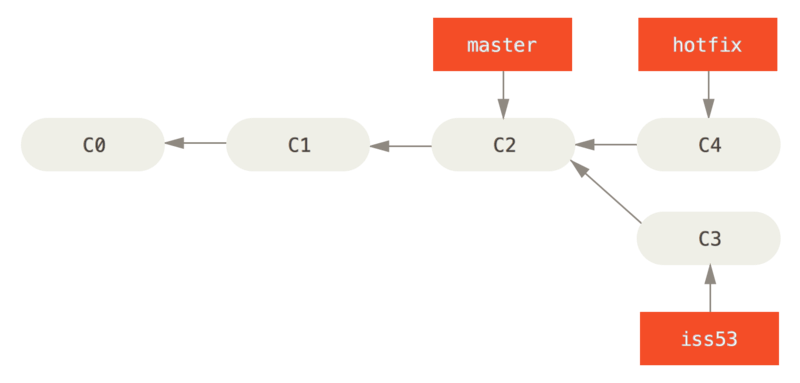
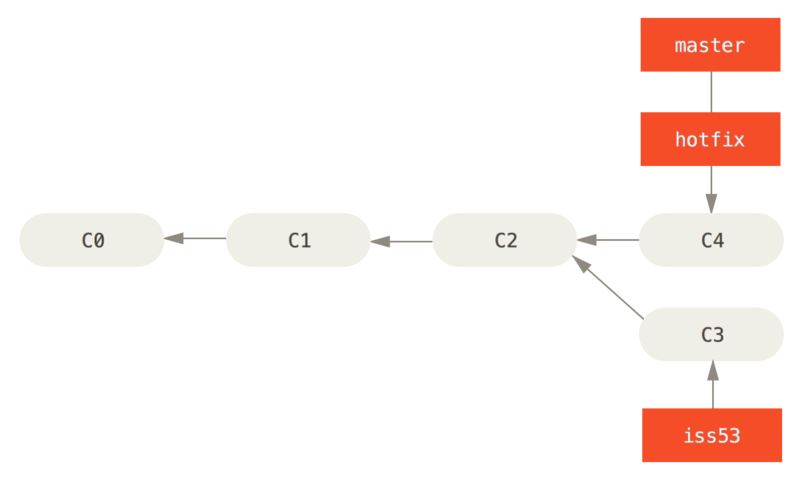
hotfix는 버그 픽스를 위해 master 브랜치에서 갈라져 나온 브랜치이고 master 브랜치는 버그 픽스가 완료된 bugfix 브랜치를 Merge하여 운영환경에 배포하려고 한다. 이때 Merge 하는 과정을 살펴보자.
$ git checkout master
$ git merge hotfix
Updating f42c576..3a0874c
Fast-forward
 index.html | 2 ++
 1 file changed, 2 insertions(+)
Merge 메시지에서 “fast-forward”가 출력된 것을 주목하자. hotfix 브랜치가 가리키는 C4 커밋이 master 브랜치가 가리키는 C2 커밋에 기반하였기 때문에 master 브랜치 포인터는 그저 최신 커밋을 가리키도록 이동한다. 이런 Merge 방식을 “fast-forward” 라고 부른다.
3-way-merge
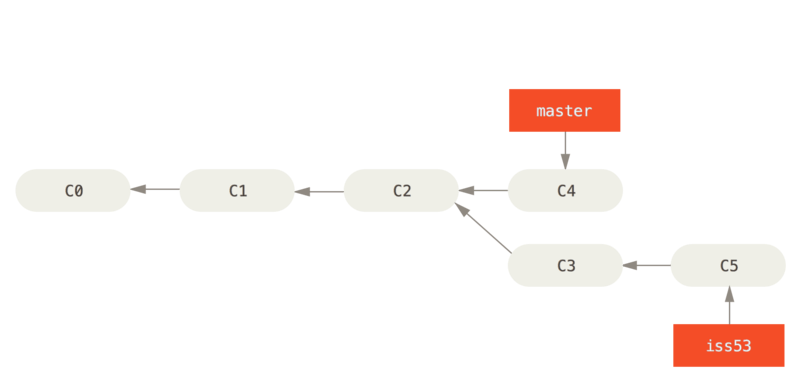
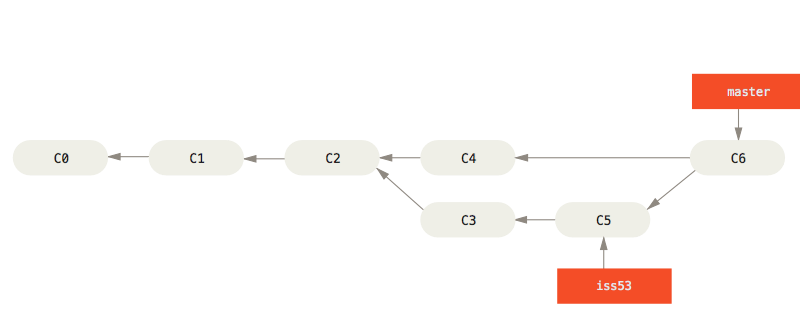
iss53는 53번 이슈를 해결하기 위해 C2 커밋을 기반으로 갈라져 나온 브랜치이고 master 브랜치는 hotfix 브랜치와 merge 되면서 C4 커밋을 가리키고 있는 상태이다. 이때 53번 이슈를 다 구현하고 master 브랜치에서 Merge 하는 과정을 살펴보자.
$ git checkout master
$ git merge iss53
Merge made by the 'recursive' strategy.
index.html |    1 +
1 file changed, 1 insertion(+)
hotfix를 Merge 했을 때와는 메시지가 다르다. 현재 브랜치가 가리키는 커밋이 Merge 할 브랜치의 부모가 아니므로 Git은 fast-forward 방식으로 Merge 하지 않는다. 이 경우에 Git은 각 브랜치가 가리키는 커밋 두개(C4, C5)와 공통 부모(C2)를 사용하여 3-way-merge를 한다. 이제 master 브랜치에는 Merge 커밋(C6)이라고 부르는 새로운 커밋이 생겼다.
🎯Conflict
- 가끔식
3-way-Merge가 실패할 때도 있다. Merge하는 두 브랜치에서 같은 파일의 한 부분을 동시에 수정하고 Merge 하면 Git은 해당 부분을 스스로 Merge 하지 못한다. - Git은 자동으로 Merge 하지 못해서 새 커밋이 생기지 않고 변경사항의 충돌을 개발자가 스스로 해결하기를 기대한다. 그 동안 Merge 과정은 진행되지 않는다.
- Merge 충돌이 발생했을 때 Git이 어떤 파일에서 충돌을 감지했는 지 살펴보려면
git status명령을 이용한다. 충돌이 일어난 파일은unmerged상태로 표시된다.
$ git merge iss53
Auto-merging index.html
CONFLICT (content): Merge conflict in index.html
Automatic merge failed; fix conflicts and then commit the result
$ git status
On branch master
You have unmerged paths.
  (fix conflicts and run "git commit")

Unmerged paths:
  (use "git add <file>..." to mark resolution)

    both modified:      index.html

no changes added to commit (use "git add" and/or "git commit -a")
충돌 발생 표시
Git은 충돌이 난 부분을 표준 형식에 따라 표시해준다. ====== 위쪽의 내용은 HEAD가 가리키는 브랜치의 내용이고 아래 쪽은 Merge 하려는 브랜치의 내용이다.
<<<<<<< HEAD:index.html
<div id="footer">contact : email.support@github.com</div>
=======
<div id="footer">
 please contact us at support@github.com
</div>
>>>>>>> iss53:index.html
충돌 해결
- 충돌을 해결하려면
======위쪽이나 아래쪽 내용 중에서 고르거나 새로 작성한다. <<<<<<<,========,>>>>>>>가 포함된 행을 삭제한다.git add명령으로 다시 Git에 저장한다.git status명령으로 충돌이 해결된 상태인지 다시 한 번 확인한다.git commit명령으로 Merge 한 것을 커밋한다. 충돌을 해결하고 Merge 할 때는 커밋 메시지가 아래와 같다.
Merge branch 'iss53'

Conflicts:
    index.html
#
# It looks like you may be committing a merge.
# If this is not correct, please remove the file
#	.git/MERGE_HEAD
# and try again.


# Please enter the commit message for your changes. Lines starting
# with '#' will be ignored, and an empty message aborts the commit.
# On branch master
# All conflicts fixed but you are still merging.
#
# Changes to be committed:
#	modified:   index.html
#
📌출처
👍 개인 공부 기록용 블로그입니다. 오류나 조언이 있으시면 언제든지 댓글 혹은 메일로 남겨주시면 감사하겠습니다! 😄
댓글남기기